
Step by step
Open the overview: Profile › Freshy & AI › Autopilot. The subtitle shows how many items are due now and how many are observed.
At the top, switch Autopilot overall between Active and Paused. All settings are kept when paused.
Purchase-interval reminders: Freshy reminds you around two days before a product usually runs out, based on the purchase date, not stock or the best-before date.
For an individual product: tap it › Intelligence & Autopilot › Automation for this product: Purchase interval, Minimum stock or Auto-deduct.
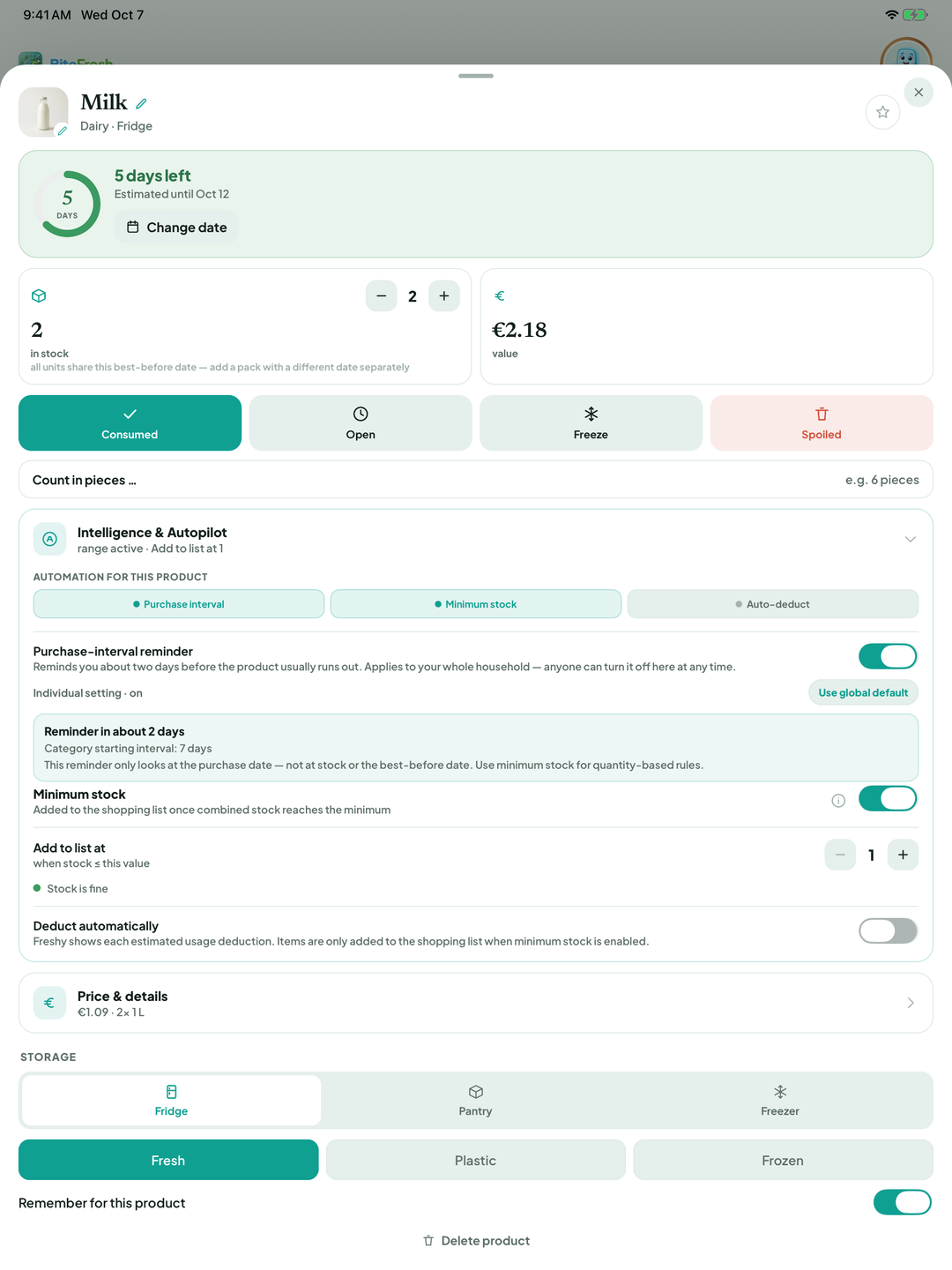
Minimum stock: set Add to list at to 2, for example. When stock is low, the product appears under Added automatically with an Autopilot badge.
Auto-deduct, for example for coffee capsules: set Deduction interval and Units per deduction. Each deduction displays an Auto-use message with Undo.
To clear rules, choose Turn off all rules › Turn all off beside the product in the Autopilot overview. Or remove the item from the shopping list and choose Remove & turn off rules.
Good to know
Autopilot never places orders. It only adds items to your shopping list; you decide what to buy.
Terms
AutopilotPurchase-interval reminderMinimum stockAuto-deductObserved onlyAdded automatically
Updated: 2026-09-30 · App version 1.0.4
More questions? Write to support@bitefresh.de.